Skillslint
CLI linter for agents skills. Runs two checks: markdown prose quality via textlint and structured quality scoring via agent-skills-cli.
Skills created via Anthropic's skill-creator are generally good and reliable, but you can also create or edit them manually — they are just SKILL.md files. This tool guards against common mistakes in both cases.
Content is verified against
@ladamczyk/skillslintv4.2.5. SeeCHANGELOG.mdto verify accuracy.
Installation
Run directly without installing:
npx @ladamczyk/skillslint
Or install locally (e.g. for use inside a QoQ pipeline):
npm install --save-dev @ladamczyk/skillslint
List all available options:
npx @ladamczyk/skillslint -h
Command
skillslint [options]
| Option | Default | Description |
|---|---|---|
-p, --path <path> | ./skills | Directory containing skill subdirectories |
-t, --threshold <n> | 70 | Overall quality threshold (0–100); used when no specific threshold flags are set |
--overall <n> | — | Required overall score |
--structure <n> | — | Required structure score |
--clarity <n> | — | Required clarity score |
--specificity <n> | — | Required specificity score |
--advanced <n> | — | Required advanced score |
-f, --fix | — | Attempt auto-fix via textlint |
-i, --ignored [names] | — | Skill directory names to skip |
Exits with code 1 if any skill fails to meet its threshold or if textlint finds unfixable issues.
Skills directory structure
Each subdirectory under --path is treated as one skill. Only SKILL.md is linted — other files in the directory are ignored.
skills/
  my-skill/
    SKILL.md
Scoring categories
Scores are computed by agent-skills-cli and range from 0 to 100.
| Category | What it measures |
|---|---|
| Overall | Weighted average of all categories |
| Structure | Document organization and completeness |
| Clarity | Writing clarity and readability |
| Specificity | Concrete examples and precise instructions |
| Advanced | Use of advanced skill features |
Use --threshold to set a single floor across all categories, or combine the individual flags (--structure, --clarity, etc.) for fine-grained control.
Textlint rules
The bundled .textlintrc.json enables:
common-misspellings— catches common spelling errorswrite-good— prose checks, with the four noisiest rules switched off (weasel,passive,adverb,tooWordy), so what's left is the readability findings worth acting on
Both plugins (@textlint/markdown and @textlint/text) are registered for .md, so every SKILL.md is read twice — once as markdown, once as plain text.
Run with -f / --fix to let textlint auto-correct issues it can resolve without manual intervention. Skills that fail with --fix on report Can't perform automatic fix! — those findings need a human.
JavaScript API
Alongside the CLI the package exports an ESM/CJS API. lint runs the same two checks and returns structured results without printing or exiting; format turns a result into the console output the CLI writes:
import { lint, format } from '@ladamczyk/skillslint';

const result = await lint({ path: './skills', threshold: 70, stats: false });

result.passed; // boolean — textlint clean and every skill over its threshold
result.skills; // Array<{ name, scores: { overall, structure, clarity, specificity, advanced }, passed }>
result.textlint; // raw textlint lint/fix results
result.fixed; // whether it ran in fix mode

process.stdout.write(await format(result));
lint() takes the same options as the CLI flags (path, threshold, the five per-category floors, fix, ignored) plus stats, which is required — see Usage statistics.
Additional named exports: buildThreshold, failsThreshold, runTextlint, hasTextlintErrors, DEFAULT_PATH, DEFAULT_THRESHOLD, and the TypeScript types (ILintOptions, ILintResult, IScores, ISkillScore, IThreshold, TTextlintLintResult, TTextlintFixResult, TTextlintResults).
Usage statistics
Skillslint counts its own runs, and only with your say-so. The first interactive run asks; the answer is stored as stats: true | false in ~/.config/skillslint.json (or $XDG_CONFIG_HOME/skillslint.json) and never asked again — edit or delete the key to change it. The JavaScript API never prompts: stats is a required boolean on lint(), so the calling host states its own user's consent.
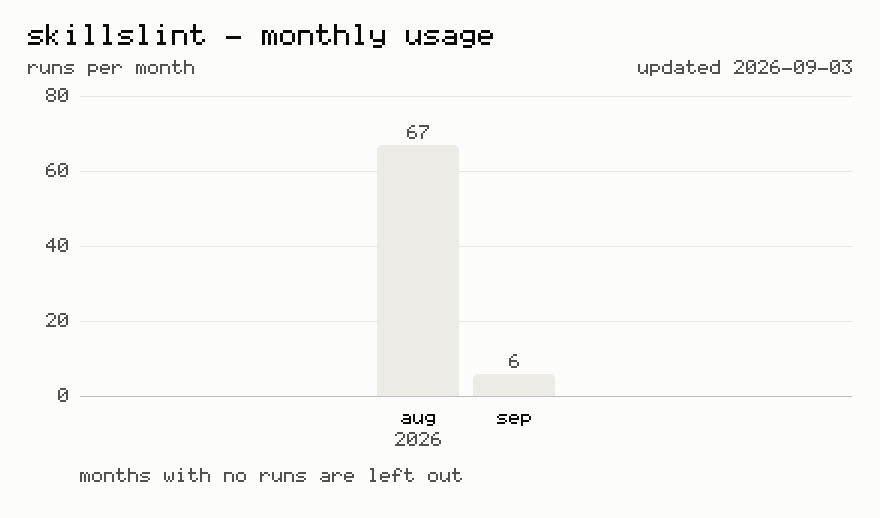
A counted run posts one constant to https://stats.adamczyk.ovh, the same body every time:
{ "tool": "skillslint", "options": [] } // `options` is always empty
Where an outbound POST never leaves the network, the same run counts as a plain image GET instead — https://adamczyk.ovh/img/stats/pixel.png?tool=skillslint — which carries the same single value and nothing more.
Never sent: your skills, file names, paths, scores, findings, thresholds, the flags you typed, project or package names, and nothing identifying you or your machine. The send is fire-and-forget with a 2s cap, so a slow or dead endpoint can't hold a run up. Runs that can't ask — CI=true or a piped stdin/stdout — are never prompted and never counted.
Changelog
Release history lives in the repo — Releases and CHANGELOG.md.